
Sale stuck on spinner
Customer is waiting. Wi-Fi dies. Checkout freezes. You lose the sale — and trust.
InvUltra
Offline-first POS, inventory, and invoicing for retailers who can't pause a sale for a spinner.
No sales call needed — create an account and try every feature free for 7 days.
Sync queued
Local DB is source of truth
The cost of downtime
Customer is waiting. Wi-Fi dies. Checkout freezes. You lose the sale — and trust.
Spreadsheets lag. Multiple counters drift. You discover stockouts after the rush.
One app for POS, another for invoices, another for loyalty. Nothing syncs cleanly.
Core advantage
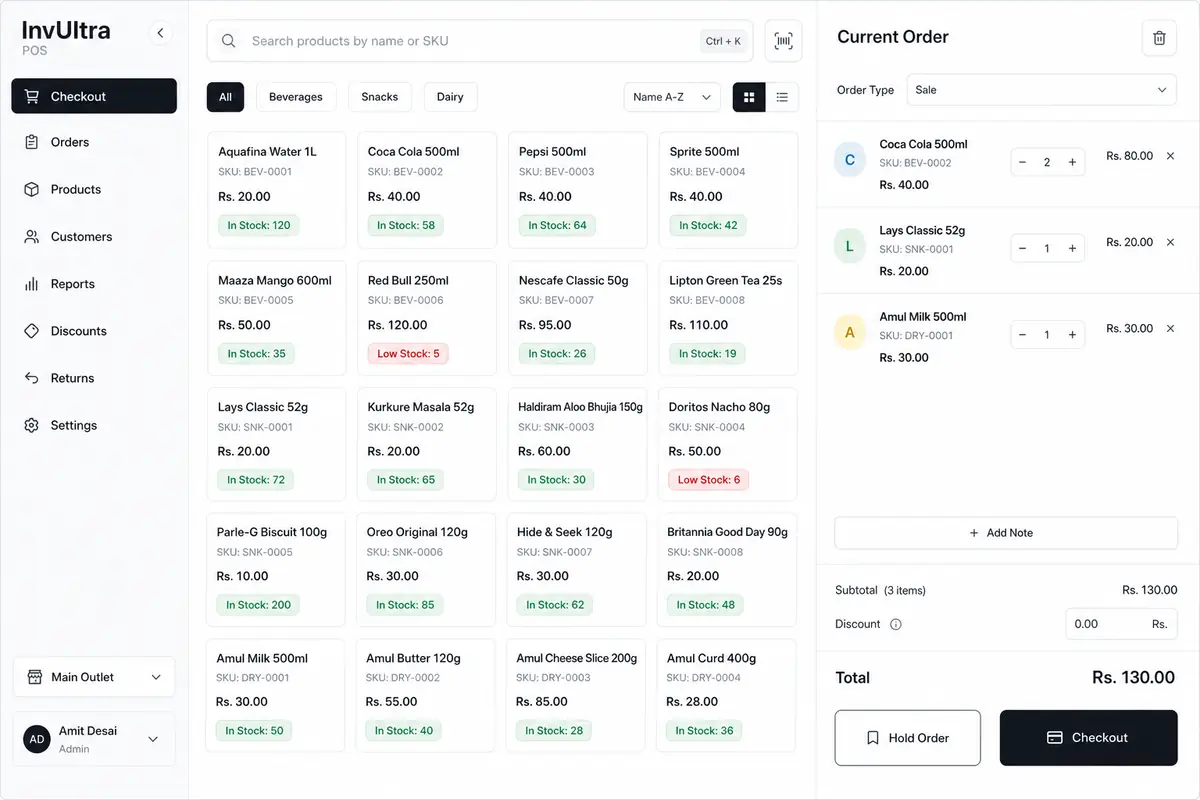
InvUltra treats your device database as the immediate source of truth. Sales, stock moves, and invoices land locally — then sync to the cloud when the network is ready.
Counter status
Selling · Offline
Cart #1842
Saved locally
Stock adjust · SKU-220
Queued
Invoice INV-991
Queued
One commerce stack
Everything your floor and back office need lives in InvUltra — so staff learn one system, not five.
Full-screen checkout, barcode scan at the counter, hold/resume, discounts, loyalty redeem, and 80mm thermal receipts — sales queue offline and sync when you're back online. Parents with variants stay off the sell grid; staff ring the child SKU. On Enterprise, every sale is tagged to the active store and receipts show branch name.
Open register with morning float, track expected cash as you sell, cash in/out, day close with counted cash and variance, Z-report by tender, and register session history.
Record daily shop costs by category — bank or card for P&L only; cash expenses automatically reduce expected drawer cash on your open register.
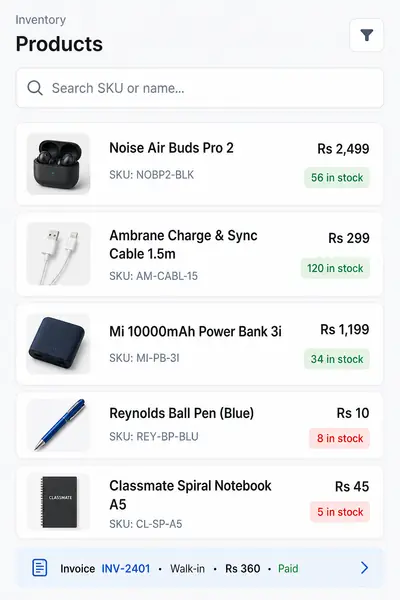
Products with SKU and barcode, categories, stock levels, low-stock alerts, stock adjustments, and product variants as child SKUs (size/color) with their own barcodes and stock. Bulk CSV import upserts by SKU and can link variants via parent_sku. Enterprise tracks quantity per branch — not just one global number.
Print shelf and sticker barcodes from any product — single item, multi-select bulk, or right after PO receive and purchase return lines. Choose 80mm thermal roll, die-cut sizes (50×25, 40×30, 58×40), or an A4 sticker sheet grid; toggle store name, product, SKU, price, and barcode digits.
Create and track vendor POs, receive stock against ordered qty, print or email the PO, and keep AP in sync as goods land. Print barcode labels for received lines so shelves match what just arrived.
Vendor-side returns mirrored to customer credit notes — issue a PR against a received PO, stock and AP adjust, then apply vendor credit or refund cash. Print A4 or 80mm, and print labels for returned products when you need them.
Sales docs, recurring invoices, customer returns via credit notes, A4 or 80mm reprint, and Invoice Designer — toggle logo, address, QR, status badge, and custom footer on both paper sizes. Email PDF with a secure share link so customers open the same branded document online — no login required.
Send invoice, quote, credit note, or purchase order PDFs by email. Each message includes a time-limited public link that mirrors your print layout (logo, company details, colored status). Re-sending reuses the active link until it expires.
Balances, groups, payments history, and customer/vendor ledgers you can print or export to CSV for your accountant. Open a vendor’s purchase returns from their profile when you need credit history fast.
Points, tiers, rewards, and discount promotions that actually drive repeat visits.
Sales trends, live profit & loss, dead stock, receivables aging, top products and customers — plus an accountant CSV pack (P&L, sales, payments, expenses) for any date range. Enterprise adds store scope: one branch, all branches consolidated, or side-by-side compare.
Enterprise plan: add branches, switch store from the header, assign staff to specific locations, run per-store registers, and move stock between stores with draft → ship → receive transfers. One product catalog tenant-wide; stock and sales stay branch-accurate.
See who did what and when — sales, stock edits, discounts, and more. Full trail for owners.
Enterprise
Chains and franchises need branch-accurate stock and sales — not one blended number. InvUltra Enterprise keeps a shared catalog while every counter, register, and report respects the store you're on.
Products and customers stay tenant-wide. Stock, sales, expenses, and register sessions are tagged to the active store — so each location has its own truth.
Create a transfer, ship from Store A, receive at Store B. Quantities update atomically — no spreadsheet handoffs between counters.
Filter P&L, sales, and inventory to one branch, roll up all stores, or compare locations side by side. Accountant CSV exports respect the same scope.
Assign cashiers to specific branches. They only see and sell from stores they're allowed on — owners switch freely across the chain.
Simple pricing
No credit card. Full features unlocked. Upgrade when you're ready — your data stays safe.
Free
Yearly: —
Test everything before you buy
Rs 1,500 / month
Yearly: Rs 15,000 / yearRs 1,250/mo effective · 2 months free
Single shop / growing business
Rs 20,000 / month
Yearly: Custom / Contact
Multi-store / chains / franchises
For shop owners
Activity logs give tenants and owners a clear trail: which user did what, and when. Built for shopkeepers who trust their team — and still want the record.
Every meaningful action is tied to a user — so you know which staff member rang the sale or edited stock.
Timestamps on each event. Spot odd late-night edits or unusual discount patterns fast.
You're not always on the floor. Activity logs let you review the day like you were standing at the counter.
How it works
Every cart, hold, and checkout writes to your device first. No network? No problem.
Changes sit in a sync queue. Your store keeps moving while the connection recovers.
Background sync pushes to the cloud. Reports and other stores catch up automatically.
Data & backups
InvUltra is built so a bad day on the server doesn't wipe your sales history. We run layered backups so recovery is possible, not a hope.
Full server backups run every day and are retained for 30 days — so you can roll back if something goes wrong.
The latest day's backup is also stored offsite, separate from the primary server, for disaster recovery.
Database dumps are captured throughout the day (about every 15 minutes) and stored offsite — shrinking how much you could lose in a worst case.
Sales, stock, and customer records are treated as critical — protected with access controls and recoverable backups, not left on a single machine.
Why InvUltra
Two reasons retailers switch: we stay online when the network doesn't, and we replace a pile of half-connected tools.
InvUltra is offline-first by design — not “offline mode” bolted on later. Your device database is the source of truth: sales, stock moves, and invoices write locally first, then sync to the cloud when the network returns. You get POS, register open/day close with Z-report, inventory with stock adjustments and size/color variants (including CSV import with parent_sku), barcode label printing, purchase orders with receive-and-label, vendor purchase returns, shop expenses, invoicing with Invoice Designer, email PDF delivery with secure share links, customer returns via credit notes, loyalty, reporting with accountant CSV export packs, owner activity logs, and — on Enterprise — multi-store with per-branch stock, stock transfers, store-scoped reports, and staff store assignment. At the counter you scan barcodes and print 80mm thermal receipts; Wi‑Fi drops never freeze checkout.
Most POS tools assume a stable connection. InvUltra assumes outages happen — and still lets you sell. Register open and day close stay online (like login); sales can continue offline. You start free without a sales call, run the counter as a PWA on phone or tablet, reconcile the drawer with expected vs counted cash, shape how invoices look without a designer, email branded PDFs with secure view links, hand your bookkeeper a date-range CSV pack, keep a full audit trail of who changed what, and protect data with daily and offsite backups. Running multiple branches? Enterprise adds store switching, inter-branch stock transfers, and compare-by-store reporting — one system replaces checkout app + spreadsheet + separate invoice tool + manual branch stock sheets.
Create an account, unlock every feature for 7 days, and upgrade when you're ready — no sales call required.